Mumble
Gaboule is currently operating at limited capacity due to issues outside of our control. We are working on improving our infrastructure and will be back online soon. Content on this page may not be up-to-date or accurate.
| Tor Support | Federated | Link |
|---|---|---|
| ⚙️ | ❌ | vc.gaboule.com |
Mumble is a voice chat application, known for its low latency and high audio quality. We are using Mumble for our voice chat needs in Gaboule!
How to install Mumble?
Step 1: Get Mumble
Binaries (Windows/macOS/Linux)
Downloads at mumble.info.
From your Linux distro's repository
Ensure your distribution is packaging the latest version.
Packaging status

Step 2: Configure Mumble
This guide was written for 1.5.857. More recent versions may have different terminology.
Audio devices
Start Mumble and configure your audio devices in the Audio Wizard that opened alongside the main window.
If you closed it accidentally, reopen in Configure > Audio Wizard
Certificate
Then, ensure you have created a certificate in Configure > Certificate Wizard
Back up your certificate! It is the only way to prove your identity and register your username permanently on the server. Export it in Configure > Certificate Wizard > Export current certificate
Network
If you are on a unreliable network and/or people have trouble understanding you because your sound is cutting out, here are some things you can try:
If your network is dropping UDP packets (bad WiFi, misconfigured router, etc.)
- Force TCP mode in Settings > Network and choose Force TCP mode under the Connection tab.
If your network is not handling QOS correctly
- Disable Use Quality Of Service.
Privacy
In Settings > Network, some options can be changed for privacy. Set these options:
- ON - Do not send OS information to Mumble servers and web servers
- OFF - Submit anonymous statistics
- ON - Hide public server list
QOL
Reconnect to the last server you were on in Settings > Network, and choose Reconnect to last server on startup.
How to join our server?
- In the menu bar, choose Server > Connect
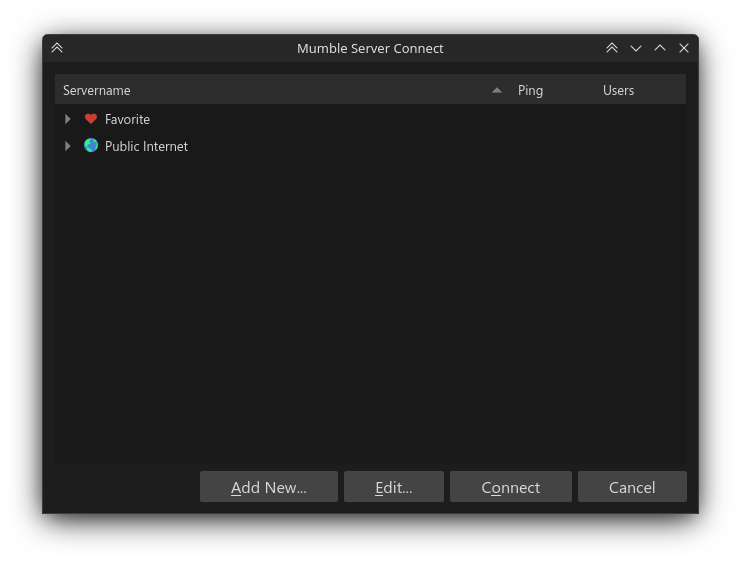
- Click on Add New and enter:
- Address:
vc.gaboule.com - Port (leave as is): 64738
- Username: use the same one as your Gaboule account.
- If you don't have an account, just choose anything but the name of another member.
- Label (leave as is):
vc.gaboule.com
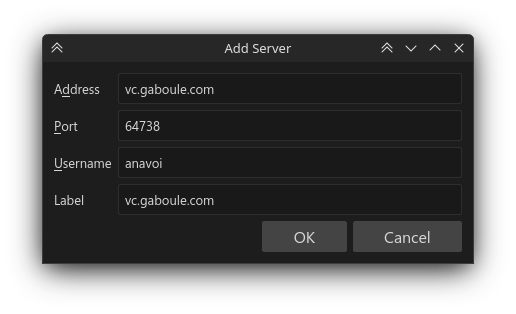
- Double click on the server entry in favorites.
- You should now be connected to our server.