Member Mail
Gaboule is currently operating at limited capacity due to issues outside of our control. We are working on improving our infrastructure and will be back online soon. Content on this page may not be up-to-date or accurate.
| Tor Support | Federated | Link |
|---|---|---|
| ⚙️ | ❌ | mail.gaboule.com |
When creating a Gaboule account, you're automatically given a special email address: yourusername@members.gaboule.com
What is it used for?
This email address serves as your primary contact point for important Gaboule communications.
You can:
- Contact Gaboule administrators
- Receive updates and special announcements on everything Gaboule
- Receive notifications from services
This service is for internal use only. For security reasons, members can only communicate with administrators.
Please use Matrix to talk to other members instead. As a bonus, it's end-to-end encrypted!
Access your mail through the web interface
To use your member mail, you can go to mail.gaboule.com.
From there, press the "Webmail" blue button.
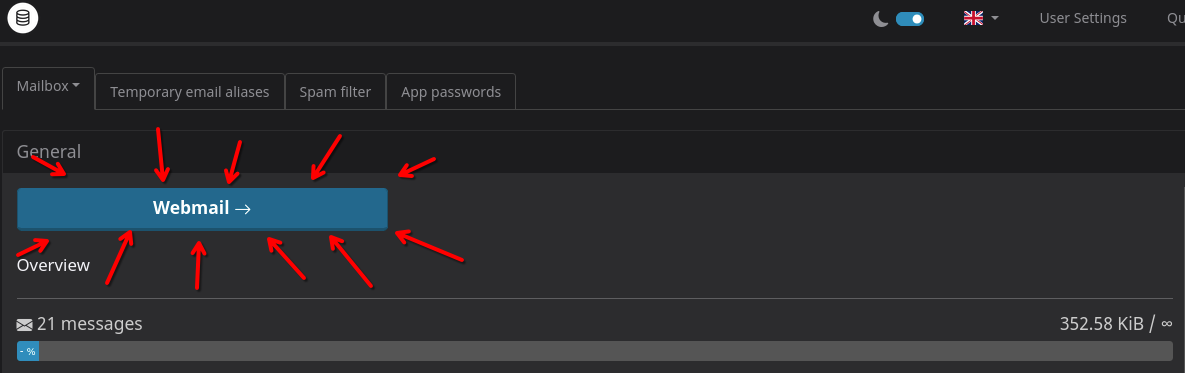
If you'd like, you can bookmark the tab to return to it later.
Advanced: Setting up a mail client
You don't have to use the webmail service to access your members.gaboule.com email address.
Instead, you can easily configure a mail client such as Thunderbird or K-9 Mail to access your member email directly.
Server settings
Here are the server settings you'll need. We heavily recommend SSL/TLS for security.
| Protocol | Hostname | Port | Encryption |
|---|---|---|---|
| SMTP | mx.gaboule.com | 465 | SSL/TLS |
| IMAP | mx.gaboule.com | 993 | SSL/TLS |
| POP3 | mx.gaboule.com | 995 | SSL/TLS |
Use the autodetect option for the authentication method. If you are using an app password, choose "Normal Password" instead.
Generate an app password
Some clients don't support Single Sign-On (SSO), so you might need to generate an app password to log in with your Gaboule account.
Here's how to do it:
- Go to mail.gaboule.com/user
- Choose the tab App passwords and create one.
- Enter a name and click the generate link
- Copy the generated password to your clipboard
- Don't forget to press the add button!